I was looking for solution for a long long time, but I didn't find a solution.
I tried these solutions, but non of them works.
- Google map trigger resize.
- change wrapping div height, width 100%.(overflow, display, position all options)
- use Google maps API callback.
capture image:
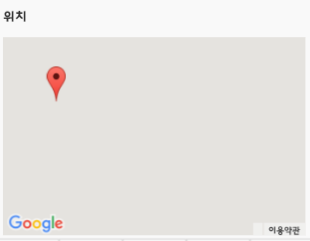
My CSS file
.content_location{
    padding: 0;
    padding-bottom: 50px;
    margin: auto;
    position: absolute !important;
    right: 0 !important;
    left: 0 !important;
    width: 95%;
    height: 35vh;
    overflow: visible;
}
#content_location{
    width: 100%;
    height: 100%;
    overflow: visible;
}
My JavaScript file
function showContent(index){
    ...
    var lat= goodslist[index]['latitude'];
    var lng= goodslist[index]['longitude'];
    var currentmapposition= new google.maps.LatLng(lat, lng);
    var mapoptions= {
        center: currentmapposition,
        zoom: 16,
        mapTypeId: google.maps.MapTypeId.ROADMAP
    };
    var infowindow= new google.maps.InfoWindow();
    var latlngbounds= new google.maps.LatLngBounds();

    if(!map){
        map= new google.maps.Map(document.getElementById('content_location'), mapoptions);
    }
    else{
        map.setOptions(mapoptions);
    }

    if(marker) marker.setMap(null);
    var tmpmarker = new google.maps.Marker({
        position: currentmapposition,
        map: map
    });
    marker= tmpmarker;

    google.maps.event.addListener(marker, 'click', (function(marker){
        return function(){
            infowindow.setContent(goodslist[index]['goodsname'] + ' : ' + goodslist[index]['address']);
            infowindow.open(map, marker);
        }
    })(marker));
    google.maps.event.trigger(map,'resize');
    $('#content_location').trigger('create');
}
My HTML file
<div class="content_location">
   <div id="content_location"></div>
</div>

Aucun commentaire:
Enregistrer un commentaire